
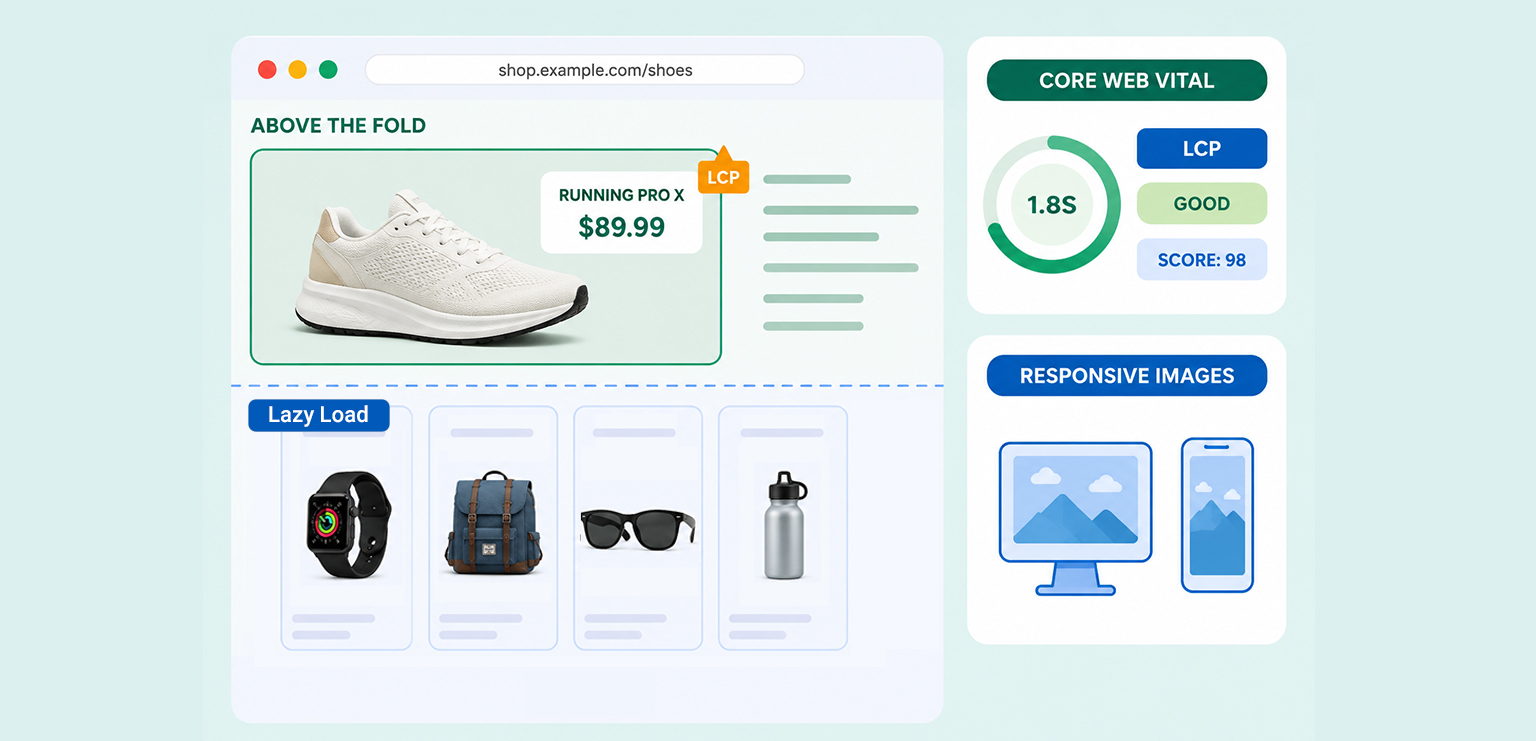
TL;DR: Lazy loading ecommerce images improves performance by delaying offscreen image downloads until users scroll near them. It reduces initial page weight, improves Core Web Vitals, and creates faster product and category pages. However, above-the-fold images and main product images should never be lazy loaded because they often affect Largest Contentful Paint (LCP).
E-commerce websites depend heavily on images, but large product galleries, banners, and collection pages can quickly slow down performance, especially on mobile devices. This is why lazy loading images in e-commerce has become essential for modern online stores.
Lazy loading delays offscreen images until users scroll near them, helping browsers prioritize visible content first. When implemented correctly, it can improve page speed, reduce bandwidth usage, and support better Core Web Vitals.
However, lazy loading the wrong images, especially above-the-fold content, can hurt Largest Contentful Paint (LCP). In this guide, you will learn the best practices for e-commerce image lazy loading without damaging SEO or user experience.
Quick Answer
Yes. Lazy loading ecommerce images improves page speed, Core Web Vitals, and overall page performance by delaying offscreen image downloads until they are needed. This reduces initial page weight and allows browsers to prioritize visible content first. However, hero banners, featured images, and primary product photos should load eagerly because lazy loading these elements can slow Largest Contentful Paint (LCP) and negatively affect the user experience.
E-commerce Lazy Loading Best Practices for Speed and LCP
- Lazy load only below-the-fold product and gallery images
- Never lazy-load hero banners or main product images above the fold
- Prioritize critical LCP images using eager loading and fetch priority
- Use responsive images so mobile users load smaller image sizes
- Combine lazy loading with WebP or AVIF for better compression
- Always define image width and height to prevent layout shifts
- Optimize product galleries without delaying visible thumbnails
- Avoid aggressive plugins that lazy-load every eCommerce image automatically
- Test lazy loading performance regularly using Lighthouse and PageSpeed Insights
- Improve Core Web Vitals while maintaining a strong user experience
What Is Lazy Loading in E-commerce?
Lazy loading is a technique that delays loading non-visible images until they are actually needed. Instead of downloading every image immediately when a page opens, the browser first loads images visible in the viewport. Additional images load later as users scroll down the page.
For e-commerce websites, this matters because online stores often contain dozens or even hundreds of images on a single page, including:
- Product thumbnails
- Gallery images
- Variant photos
- Recommendation sliders
- Review images
- Category banners
Without image lazy loading, browsers attempt to fetch all these assets immediately, slowing rendering and increasing network requests. Modern browsers support native lazy loading using:
<img src="product.webp" loading="lazy" alt="Product image">Google recommends lazy loading below-the-fold images so browsers can prioritize visible content and reduce unnecessary resource downloads.
Why Lazy Loading Matters for E-commerce Performance
E-commerce sites are naturally image-heavy. High-resolution visuals help conversions, but they also increase loading time if not optimized properly.
This is why lazy loading of eCommerce images has become a standard optimization strategy for modern stores. When implemented correctly, it can improve:
- Initial page speed
- Mobile browsing experience
- Core Web Vitals
- Bandwidth efficiency
- Rendering performance
Imagine a category page containing 60 product thumbnails. Without lazy loading, every image downloads immediately, even if users never scroll beyond the first few rows. By delaying offscreen assets, browsers can prioritize critical content first, making pages feel faster and more responsive.
How Lazy Loading Affects LCP
Largest Contentful Paint (LCP) measures how quickly the largest visible element appears on screen. On e-commerce websites, the LCP element is often:
- Hero banners
- Main product images
- Featured collection banners
This is where many stores make mistakes. Google specifically warns against lazy loading above-the-fold images because doing so delays critical rendering. If the browser postpones loading a hero image or primary product photo, LCP becomes slower instead of faster.
For example, this can hurt performance:
<img src="hero-banner.webp" loading="lazy">The browser delays fetching the image until layout calculations determine its visibility. Instead, critical images should load eagerly:
<img
  src="hero-banner.webp"
  loading="eager"
  fetchpriority="high"
alt="Summer collection">fetchpriority="high" helps browsers prioritize important LCP images earlier.
How to Implement Lazy Loading on E-commerce Websites
Modern browsers support native image lazy loading using the loading="lazy" attribute. This delays offscreen images until users scroll near them, helping pages load faster.
Basic Lazy Loading Example
<img
  src="product-image.webp"
  alt="Running shoes"
  width="600"
  height="600"
  loading="lazy">
However, not every e-commerce image should be lazy-loaded.
Images That SHOULD Be Lazy Loaded
- Product thumbnails below the fold
- Related products
- Review galleries
- Secondary gallery images
- Infinite-scroll products
Images That Should NOT Be Lazy Loaded
- Hero banners
- Main product images
- Featured collection banners
- Above-the-fold images
Critical images should load eagerly instead:
<img
  src="hero-banner.webp"
  alt="Summer collection"
  loading="eager"
  fetchpriority="high">
After implementation, test pages with Google PageSpeed Insights or Lighthouse to ensure that important LCP images are not accidentally lazy-loaded.
How to Test Lazy Loading Performance
Several tools can help identify lazy loading problems and LCP factors:
| Tool | Purpose |
|---|---|
| Google PageSpeed Insights | Detect Core Web Vitals issues |
| Lighthouse | Performance auditing |
| Chrome DevTools | Analyze image loading behavior |
| WebPageTest | Advanced speed testing |
Does Lazy Loading Help SEO?
Indirectly, yes. Lazy loading itself is not a direct ranking factor, but faster websites usually create better user experiences and improved Core Web Vitals.
When implemented correctly, it can help:
- Reduce bounce rates
- Improve mobile usability
- Enhance perceived speed
- Improve Core Web Vitals performance
Google supports properly implemented lazy loading, especially when below-the-fold images are deferred correctly.
Best Practices for Lazy Loading E-commerce Images
These best practices will help you implement lazy loading eCommerce images correctly to improve page speed, optimize LCP, and maintain a smooth user experience across product and collection pages.
1. Lazy Load Only Below-the-Fold Images
The safest strategy is selective lazy loading. Good candidates include:
- Related products
- Review galleries
- Footer banners
- Infinite-scroll products
- Secondary gallery images
Avoid applying lazy loading to every image automatically. Many e-commerce themes and plugins do this by default, which often harms LCP performance.
2. Prioritize Main Product Images
The primary product image is usually one of the most important visual elements on a product page. It should load eagerly, use compressed formats, include dimensions, use responsive sizing, and avoid lazy loading
Example:
<img
  src="shoe-main.webp"
  alt="White running shoe"
  width="900"
  height="900"
  loading="eager"
  fetchpriority="high">
This ensures the browser loads the image immediately rather than delaying it unnecessarily.
3. Optimize Product Galleries Carefully
Large product galleries are ideal for lazy loading, but only secondary images should be deferred. A practical setup looks like this:
- Main visible image → eager load
- Hidden gallery images → lazy load
- Zoom images → lazy load
- Alternate product angles → lazy load
This reduces unnecessary downloads while maintaining a smooth shopping experience.
4. Always Define Width and Height
One common implementation mistake is forgetting image dimensions. Without width and height attributes, browsers cannot reserve layout space before images load. This can cause layout shifts and negatively affect Core Web Vitals.
Correct implementation:
<img
  src="backpack.webp"
  alt="Leather backpack"
  width="800"
  height="800"
  loading="lazy">
Defining dimensions improves layout stability and creates a smoother browsing experience.
5. Combine Lazy Loading With Modern Image Formats
Lazy loading alone is not enough if image files remain oversized.
For better ecommerce performance, combine lazy loading with:
- WebP
- AVIF
- Compression
- Responsive images
- CDN delivery
Modern image formats significantly reduce file sizes without noticeable quality loss.
Responsive Images and Lazy Loading
Responsive images are especially important for mobile e-commerce performance. Mobile users should not download large desktop-sized assets unnecessarily.
Example:
<img
  src="product-800.webp"
  srcset="
    product-400.webp 400w,
    product-800.webp 800w,
    product-1200.webp 1200w"
  sizes="(max-width: 768px) 100vw, 50vw"
  loading="lazy"
  alt="Coffee table">
This allows browsers to select the most appropriate image size for the device. Combining responsive images with deferred image loading often delivers even greater performance gains.
Common Lazy Loading Mistakes E-Commerce Sites Make
Below are some of the most common lazy loading mistakes that e-commerce websites make that can negatively affect page speed, LCP, and Core Web Vitals.
Lazy Loading Above-the-Fold Images
This is the biggest mistake affecting lazy loading LCP performance. Hero banners and visible product images should always load eagerly.
Lazy Loading Everything Automatically
Some optimization plugins aggressively lazy-load all images without considering viewport visibility. This often creates slower rendering and poor LCP scores.
Using Oversized Images
Lazy loading delays downloads, but large images still consume bandwidth once loaded. Compression and resizing remain essential.
Ignoring Mobile Layouts
An image below the fold on a desktop may appear above the fold on mobile. Always test mobile pages separately when implementing lazy-loading e-commerce images.
Conclusion
Lazy loading is an effective way to improve e-commerce website performance when used correctly. By delaying offscreen image downloads, online stores can reduce page weight, improve rendering speed, and create smoother mobile experiences.
The key is strategic implementation. Above-the-fold images should load eagerly, while secondary product images and galleries can be lazy-loaded safely. Combined with responsive images and modern formats like WebP, lazy loading product images can improve page speed, Core Web Vitals, and overall user experience without sacrificing visual quality.
FAQs
Q1. What is lazy loading in e-commerce websites?
Q2. How does lazy loading improve e-commerce page speed?
Q3. Can lazy loading improve Largest Contentful Paint (LCP)?
Q4. Should above-the-fold images be lazy loaded?
Q5. Does lazy loading help Core Web Vitals?
Q6. Should product galleries use lazy loading?
29 May, 2026
Leave a Comment
Ishan Makkar
He is a web performance specialist focused on image optimization and site speed. As the founder of Image Optimizer Pro, he helps businesses reduce image load times and improve Core Web Vitals. His work centers on delivering faster websites, better user experience, and measurable SEO gains without complex development.