
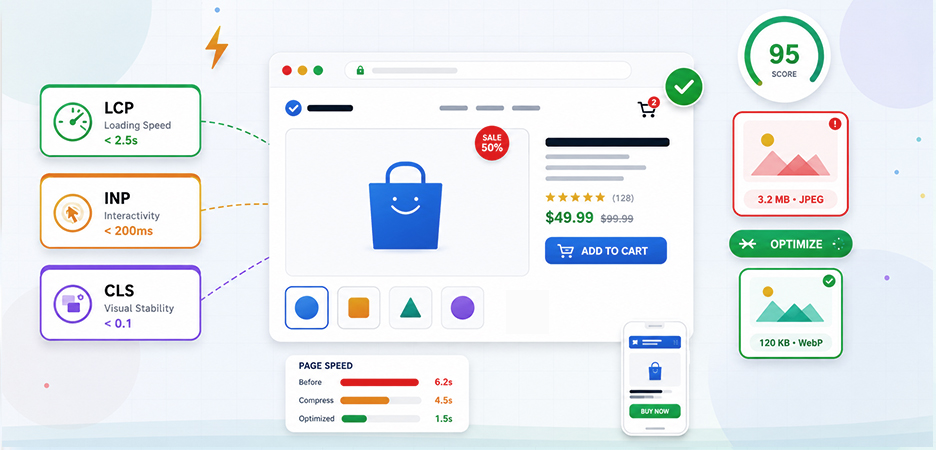
TL;DR: Most stores fail e-commerce Core Web Vitals because of unoptimized images. Heavy product and banner images slow down Largest Contentful Paint (LCP), hurting rankings and conversions. Compressing images, using WebP or AVIF formats, and optimizing image delivery are some of the fastest ways to improve your store’s Core Web Vitals and page speed.
If you run an online store, you already know that slow pages kill conversions. But what most store owners don’t realize is that e-commerce Core Web Vitals, Google’s official metrics for page experience, are failing on roughly 70% of online stores, and unoptimized images are one of the biggest reasons.
Product pages are heavy by nature: high-resolution product photos, lifestyle banners, gallery carousels. Most stores simply upload images as they are, without compressing them or converting them into modern formats. Poor e-commerce image optimization habits are often enough to push stores into failing Core Web Vitals, even when the rest of the site is reasonably optimized.
This guide breaks down exactly why so many e-commerce stores fail, and what you can do about it, starting with the one fix that moves the needle more than anything else, your store images.
What Are Core Web Vitals? (And Why E-commerce Gets Hit Harder)
Google officially defines Core Web Vitals as three performance metrics that measure real-world user experience for loading performance, interactivity, and visual stability:
Largest Contentful Paint (LCP) measures how quickly the main visible content on a page loads, usually the hero product image or banner on an e-commerce store. Google’s threshold for a “good” LCP is under 2.5 seconds. Anything over 4 seconds is considered poor.
Interaction to Next Paint (INP) replaced First Input Delay (FID) in March 2024. It measures how quickly a page responds to user interactions, such as clicking “Add to Cart,” filtering products, and applying coupon codes. A good INP is under 200 milliseconds.
Cumulative Layout Shift (CLS) tracks visual stability, how much page elements shift unexpectedly as content loads. A score below 0.1 is considered good. Every online shopper has experienced the frustration of accidentally clicking the wrong button because the page jumped. That’s a CLS failure.
According to the 2025 Web Almanac by HTTP Archive, only 48% of mobile pages and 56% of desktop pages pass all three Core Web Vitals. That means more than half the web is failing on mobile, and e-commerce sites sit at the worst end of this spectrum, because they are inherently heavier: more product images, more JavaScript for filters and carts, more third-party scripts for analytics and chat.
The March 2024 INP update alone caused nearly 600,000 websites that previously passed Core Web Vitals to start failing because the new metric measures overall interaction responsiveness, not just the first interaction.
Why 70% of E-commerce Stores Fail Core Web Vitals: The Real Causes
Most e-commerce stores fail Core Web Vitals because of oversized images, heavy third-party scripts, slow mobile performance, and poorly optimized product pages. Below, we’ll break down the biggest performance issues affecting online stores and how to fix them effectively.
1. Large Product Images Slow Down LCP
According to the HTTP Archive 2025 Web Almanac, images are the single heaviest resource on the median web page, and on e-commerce product pages, they account for 50–70% of total byte weight. The hero product image sitting above the fold is almost always the LCP element, so when it’s a 3-4MB uncompressed JPEG, it single-handedly fails your LCP regardless of how well everything else is optimized.
The problem gets worse at scale. Most stores have hundreds or thousands of product images uploaded by non-technical staff, and most platforms simply serve whatever gets uploaded, original size, original format, no optimization applied.
2. Stores Still Using JPEG and PNG Images
In 2026, a large portion of e-commerce stores are still serving JPEG and PNG images instead of modern formats like WebP and AVIF. The performance difference is significant.
In the ongoing comparison of WebP vs AVIF, WebP images are typically 25–34% smaller than JPEGs at similar quality, while AVIF can reduce file sizes by nearly 50–65%. Smaller image sizes mean faster loading pages, improved mobile performance, and better Core Web Vitals scores.
The real-world impact can be massive. One developer audit shared on the DEV Community found that switching an e-commerce client from uncompressed PNGs to compressed WebP images reduced page weight from 8.2 MB to 1.4MB and improved mobile load time by 3.7 seconds, without any redesign or layout changes.
That’s not a minor optimization; it’s a major improvement in user experience and page speed.
3. Missing Image Dimensions Cause Layout Shifts
This is one of the most overlooked causes of CLS issues on e-commerce stores. When an image doesn’t have explicit width and height attributes in the HTML, the browser doesn’t know how much space to reserve for it. So the page renders without the image, then jumps when it loads, causing a layout shift that tanks your CLS score.
On a typical Shopify or WooCommerce product page with 6–8 images, each missing its dimensions, the cumulative layout shift quickly pushes a store into “Poor” territory.
4. No Lazy Loading Implementation
E-commerce product pages often load every single product image on the page at once, including the images that are far below the fold, and the user may never scroll to see. Every unnecessary above-the-fold byte is a byte the browser has to download before it can paint your LCP element.
Lazy loading tells the browser to defer loading off-screen images until the user actually scrolls toward them. It’s a native browser feature (loading=”lazy”) that requires no extra code. While many modern platforms support native lazy loading today, it is still commonly misconfigured or disabled on image-heavy product pages.
5. Same Image Size Served Across All Devices
A 3,000-pixel-wide product image served to a mobile phone with a 390px viewport is downloading roughly 59 times more image data than necessary. That wasted bandwidth translates directly into a slower LCP.
Responsive images using srcset and the <picture> element solve this by serving the right image size to the right device, but implementing this correctly across a product catalog of thousands of SKUs is exactly where most stores fall short.
6. Missing Preload for Above-the-Fold Images
The browser, by default, doesn’t discover your hero product image until it has parsed the HTML and CSS. For e-commerce pages, the delay between when the page starts loading and when the browser even begins downloading the LCP image can add 500ms–1,500ms to your LCP.
Using <link rel="preload" as="image"> for your above-the-fold hero image tells the browser to start fetching it immediately, often the single highest-ROI LCP improvement available.
How to Pass E-commerce Core Web Vitals: Proven Fixes
The fastest way to pass e-commerce Core Web Vitals is to fix your images first. Since images account for 50–80% of a typical product page’s total byte weight, and your hero image is almost always the LCP element, image optimization alone can move a store from failing to passing.
Here’s exactly what to do.
Tip 1: Compress Every Product Image Before Anything Else
Start here, because nothing else matters if your images are 3MB JPEGs. A well-compressed product image under 150KB loads dramatically faster with no visible quality difference to the shopper. Use these targets as your baseline:
- Hero images (above the fold):under 100–150KB
- Product gallery images: under 80KB
- Category thumbnails: under 40KB
- Banners and lifestyle images: under 200KB
For stores with hundreds or thousands of SKUs, compressing images one by one isn’t realistic.
Tools like Image Optimizer Pro handle bulk image optimization for e-commerce in a single click, up to 80% file size reduction with no quality loss, and automatically compress new uploads as inventory grows, so you’re not constantly playing catch-up.
Tip 2: Switch to WebP or AVIF Formats
JPEG and PNG are holding your store back. WebP images are typically 30% smaller than comparable JPEGs, while AVIF delivers up to 65% smaller file sizes than JPEG at equivalent visual quality.
However, AVIF support and implementation workflows are still less consistent across platforms compared to WebP, which is why many e-commerce stores continue using WebP as the more practical format today.
Implement both using the <picture> element so every browser gets the best format it supports:
The fetchpriority="high" attribute tells the browser to
prioritize this image immediately, critical for your above-the-fold LCP
element. For everything below the fold, use
loading="lazy"
instead of
loading="eager".
Tip 3: Always Declare Image Dimensions to Fix CLS
Missing width and height attributes are the most common cause of layout shifts on e-commerce pages. Without them, the browser reserves no space for the image, and the page jumps when it loads, instantly pushing your CLS score above 0.1.
Set these at the template level so every product image on your store gets them automatically, not just the ones you remember to fix manually.
Tip 4: Serve Responsive Images for Mobile
A 3,000px image served to a 390px mobile screen downloads roughly 59x more data than necessary. Use srcset to serve the right image size for each device:
Tip 5: Preload Your LCP Hero Image
The browser often doesn’t discover your above-the-fold hero image until it’s finished parsing HTML and CSS, adding 500–1,500ms to your LCP for free. A preload hint in the <head> fixes this:
This is especially high-impact on homepages and category pages with large banners. Combined with proper compression, format conversion, and responsive sizing, it routinely pushes LCP from “Poor” into “Good” territory without any other page changes.
E-commerce Image Optimization by Platform: What to Know
The approach to e-commerce image optimization varies slightly by platform:
Shopify serves images through its own CDN and supports WebP delivery automatically for browsers that accept it. However, it does not compress your original uploaded images. Oversized originals still result in oversized delivery. Shopify image optimization is essential in this case for a faster loading Shopify store.
WooCommerce / WordPress requires more hands-on configuration. Image compression plugins can handle format conversion and compression, but they add processing overhead. A platform-level solution that compresses at the CDN or build level performs better.
BigCommerce, Wix, and Squarespace each have their own image handling pipelines. The BigCommerce, Wix, and Squarespace image compressors integrate directly with these platforms, meaning you don’t need to manually export and reimport optimized images.
The key principle, regardless of platform: optimize images before they hit your CDN, not after. Compressing a 5MB image to 150KB before upload means every cached version of that image, on every CDN edge server globally, is the compressed version.
Conclusion
Most online stores fail e-commerce Core Web Vitals because of unoptimized images. Heavy product photos and oversized banners slow down LCP, increase page weight, and hurt both rankings and conversions.
The solution is straightforward: compress images, use modern formats like WebP and AVIF, add proper image dimensions, lazy load offscreen assets, and optimize hero banners. These changes can dramatically improve page speed without requiring a complete site rebuild.
For stores with large catalogs, bulk image optimization is essential. Automating compression and format conversion across your product library is the fastest and most scalable way to improve Core Web Vitals performance.
Passing Core Web Vitals is ultimately about delivering a faster experience for real users, and image optimization is where most e-commerce stores can make the biggest impact.
Frequently Asked Questions
Q1: How do images affect Core Web Vitals in e-commerce?
Images heavily impact all Core Web Vitals metrics. Large uncompressed images slow down LCP, images without dimensions cause CLS issues, and heavy image-heavy pages can delay interactions, affecting INP. This makes e-commerce image optimization one of the most important performance improvements for online stores.
Q2: Why do e-commerce stores fail the Largest Contentful Paint (LCP)?
Q3: Can large banner images hurt e-commerce page speed?
Yes. Homepage and category banners are often the largest visible element on a page, making them the primary LCP element. Large, unoptimized banners can dramatically slow loading times and hurt Core Web Vitals scores.
Q4: Does image compression improve Core Web Vitals?
Q5: Should e-commerce stores use WebP or AVIF images?
13 May, 2026
Leave a Comment
Ishan Makkar
He is a web performance specialist focused on image optimization and site speed. As the founder of Image Optimizer Pro, he helps businesses reduce image load times and improve Core Web Vitals. His work centers on delivering faster websites, better user experience, and measurable SEO gains without complex development.