
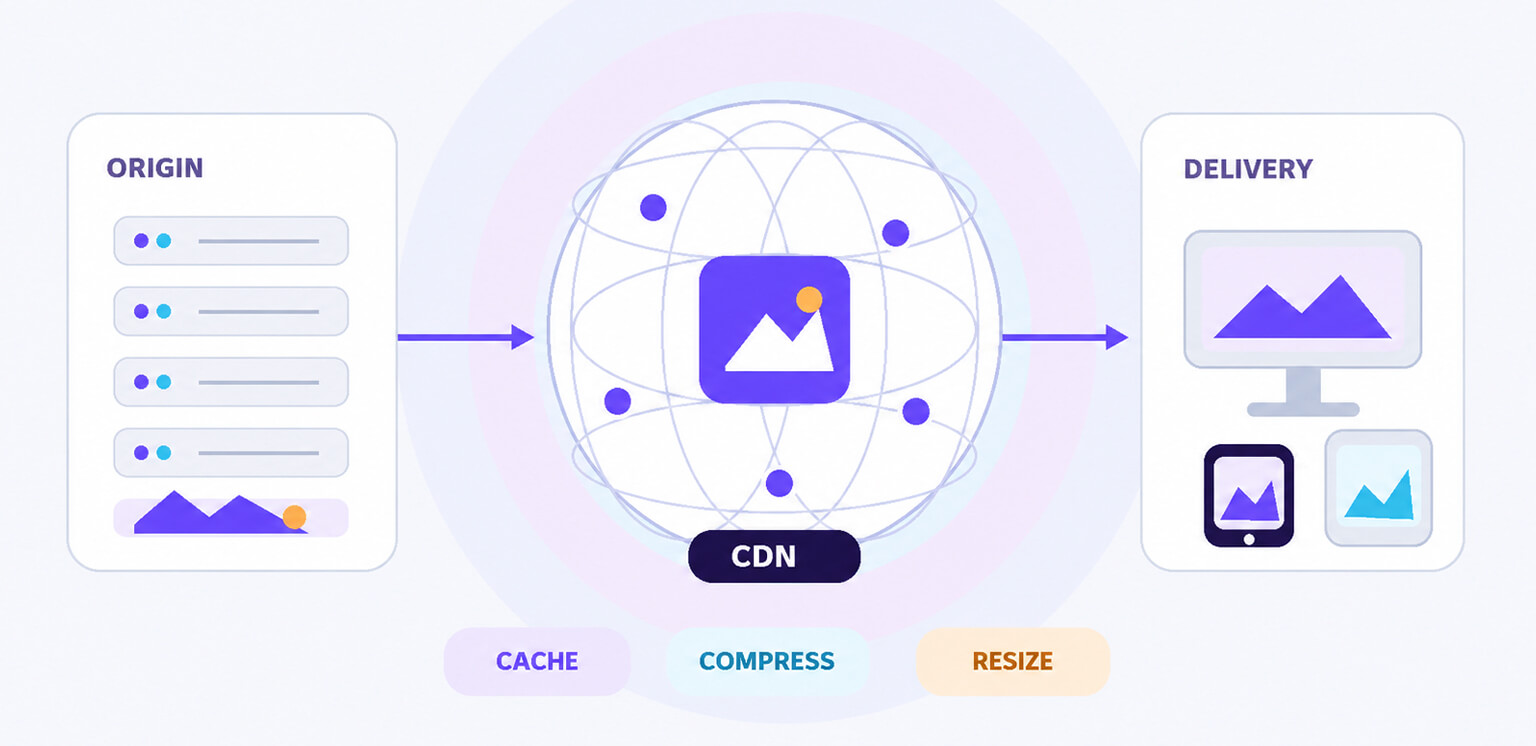
TL;DR: An image CDN stores and delivers your website images from servers closest to each visitor while automatically optimizing them for different devices and browsers. The result is faster page loads, improved Core Web Vitals, better SEO, lower bandwidth usage, and a smoother user experience.
Images often account for the largest portion of a webpage’s total size. High-resolution product photos, banners, and lifestyle images make websites visually appealing, but they can also slow down your website if they’re not delivered efficiently.
That’s where an image CDN comes in. Instead of simply storing images on your web server, an image CDN intelligently delivers optimized versions from a global network of servers. This significantly improves website speed while helping maintain image quality, making it one of the most effective techniques for modern website image optimization.
Benefits of Image CDN for Speed, SEO and UX
An image CDN (Image Content Delivery Network) stores, optimizes, and delivers images from servers closest to visitors. It helps websites load faster, improves SEO performance, and provides a better browsing experience.
| Benefit | How an Image CDN Helps |
|---|---|
| Website Speed | Delivers optimized images from nearby servers. |
| SEO | Supports faster pages and better Core Web Vitals. |
| User Experience | Loads high-quality images quickly on any device. |
| Performance | Compresses, caches, and serves WebP/AVIF images. |
| Best For | Ecommerce, blogs, SaaS, and image-heavy websites. |
What Is an Image CDN?
An image CDN (Image Content Delivery Network) is a specialized service that delivers website images from geographically distributed servers while optimizing them in real time.
Unlike a traditional CDN that caches static files, an image delivery network focuses specifically on images. It can automatically compress images, resize them for different screen sizes, convert them into modern formats, and serve them from the nearest edge location.
For example, if your website is hosted in New York and a visitor accesses it from Australia, downloading images directly from your server introduces additional latency. With an image CDN, those images are delivered from a nearby server in Australia, dramatically reducing loading time.
How an Image CDN Works
The process is surprisingly simple:
- Images are uploaded or stored on your origin server.
- The image CDN caches those files across global edge servers.
- When someone visits your website, the CDN identifies the closest server.
- The image is optimized based on the visitor’s device, browser, and network conditions.
- The optimized image is delivered almost instantly.
Many modern image optimization CDN platforms also perform on-the-fly optimizations without requiring multiple image versions.
Why Images Have the Biggest Impact on Website Speed
According to Google, images typically represent the largest share of downloaded page resources.
Large, unoptimized images can lead to:
- Slow Largest Contentful Paint (LCP)
- Increased bandwidth usage
- Poor mobile performance
- Higher bounce rates
- Lower conversion rates
Even a well-designed website can feel sluggish if visitors wait several seconds for large images to load. Using an image CDN for website speed addresses this issue without sacrificing visual quality.
Top Benefits of Using an Image CDN
From faster loading times to automatic optimization, an image CDN offers several benefits that improve website speed, SEO, and user experience.
Faster Image Delivery
The biggest advantage is fast image delivery. Instead of requesting every image from a single hosting server, visitors download them from nearby CDN edge locations. Shorter physical distance means lower latency and quicker rendering. This becomes especially important for websites serving global audiences.
Automatic Image Compression
An image optimization CDN reduces image file sizes without noticeably affecting quality. Most platforms support lossy compression, lossless compression, adaptive compression, and smart quality adjustments to reduce file sizes while preserving visual quality. Smaller files mean faster downloads and reduced bandwidth costs.
Responsive Image Delivery
Modern websites are viewed on everything from phones to ultra-wide monitors. Responsive image delivery ensures each visitor receives the correctly sized image instead of downloading unnecessarily large files. For example:
| Device | Image Served |
|---|---|
| Mobile | 480px |
| Tablet | 768px |
| Laptop | 1280px |
| Desktop | 1920px |
This prevents wasted bandwidth and improves loading performance.
WebP and Modern Format Delivery
Many image CDNs automatically convert JPEG and PNG files into newer formats like WebP or AVIF whenever the visitor’s browser supports them.
WebP image delivery often reduces image sizes by 25–35% compared to JPEG while maintaining comparable visual quality, according to Google. If a browser doesn’t support newer formats, the CDN automatically serves the original image.
Intelligent Image Caching
One of the biggest image CDN benefits is efficient image caching. Once an image has been delivered, it remains cached on nearby edge servers. Future visitors can retrieve that cached version without repeatedly requesting it from your origin server.
Benefits include:
- Lower server load
- Faster repeat visits
- Reduced hosting bandwidth
- Better scalability during traffic spikes
How an Image CDN Improves SEO
Although Google doesn’t rank websites simply because they use an image CDN, faster websites generally provide stronger performance signals. An image CDN supports image CDN SEO by helping improve:
1. Better Core Web Vitals
Optimized image delivery contributes to:
- Faster Largest Contentful Paint (LCP)
- Lower layout shifts when responsive images are properly implemented
- Better overall page responsiveness
These metrics form Google’s Core Web Vitals, which measure real-world user experience.
2. Better Crawl Efficiency
Smaller image files reduce the amount of data crawlers need to download. While crawl budget is rarely an issue for smaller sites, faster-loading pages allow search engines to process content more efficiently.
3. Improved User Experience
Visitors expect websites to load quickly. When pages render faster, users are more likely to:
- Stay longer
- Browse additional pages
- Complete purchases
- Return later
Faster websites create a smoother browsing experience, making visitors more likely to stay engaged and continue exploring your content.
Image CDN vs Traditional CDN
While both improve content delivery, an image CDN goes a step further by automatically optimizing images for size, format, and device. The table below highlights the key differences.
| Feature | Traditional CDN | Image CDN |
|---|---|---|
| Global delivery | ✓ | ✓ |
| Image compression | Limited | ✓ |
| Automatic resizing | ✗ | ✓ |
| Responsive image delivery | Limited | ✓ |
| WebP image delivery | Sometimes | ✓ |
| Image optimization | Basic | Advanced |
Best Practices for Website Image Optimization
An image CDN delivers the best results when combined with other optimization techniques.
Use Modern File Formats
Choose WebP or AVIF whenever practical while maintaining compatibility for older browsers.
Enable Lazy Loading
Lazy loading images ensures below-the-fold content loads only when users scroll, reducing initial page weight.
Compress Images Before Uploading
Although CDNs optimize images automatically, uploading reasonably compressed originals improves efficiency.
Resize Large Images
Avoid uploading 5000-pixel images when they’ll only display at 800 pixels.
Optimize Images in Bulk
For websites with hundreds or thousands of images, bulk image optimization saves considerable time while maintaining consistency across the site.
When Should You Use an Image CDN?
Almost every website can benefit, but it’s particularly valuable for:
- Ecommerce stores with large product catalogs
- Photography portfolios
- Travel websites
- News publishers
- SaaS companies
- Blogs with image-rich articles
- Real estate listings
- Educational platforms
If images make up a significant portion of your webpages, implementing an image CDN is one of the fastest ways to improve website loading speed.
Conclusion
An image CDN does much more than distribute files across global servers. It intelligently compresses, resizes, caches, and delivers images based on each visitor’s device and location, making websites faster and more efficient.
Combined with modern practices like image compression, responsive image delivery, lazy loading images, and bulk image optimization, an image CDN helps reduce page weight, improve Core Web Vitals, support SEO, and create a smoother browsing experience.
As websites continue to rely on rich visual content, adopting an image CDN has become a practical step toward better website performance and a more consistent user experience.
Frequently Asked Questions
Does an image CDN improve SEO?
Is an image CDN the same as a regular CDN?
Can an image CDN automatically convert images to WebP?
Do I still need image compression if I use an image CDN?
Does an image CDN help mobile performance?
Who benefits the most from an image CDN?
6 August, 2026
Leave a Comment
Ishan Makkar
He is a web performance specialist focused on image optimization and site speed. As the founder of Image Optimizer Pro, he helps businesses reduce image load times and improve Core Web Vitals. His work centers on delivering faster websites, better user experience, and measurable SEO gains without complex development.