
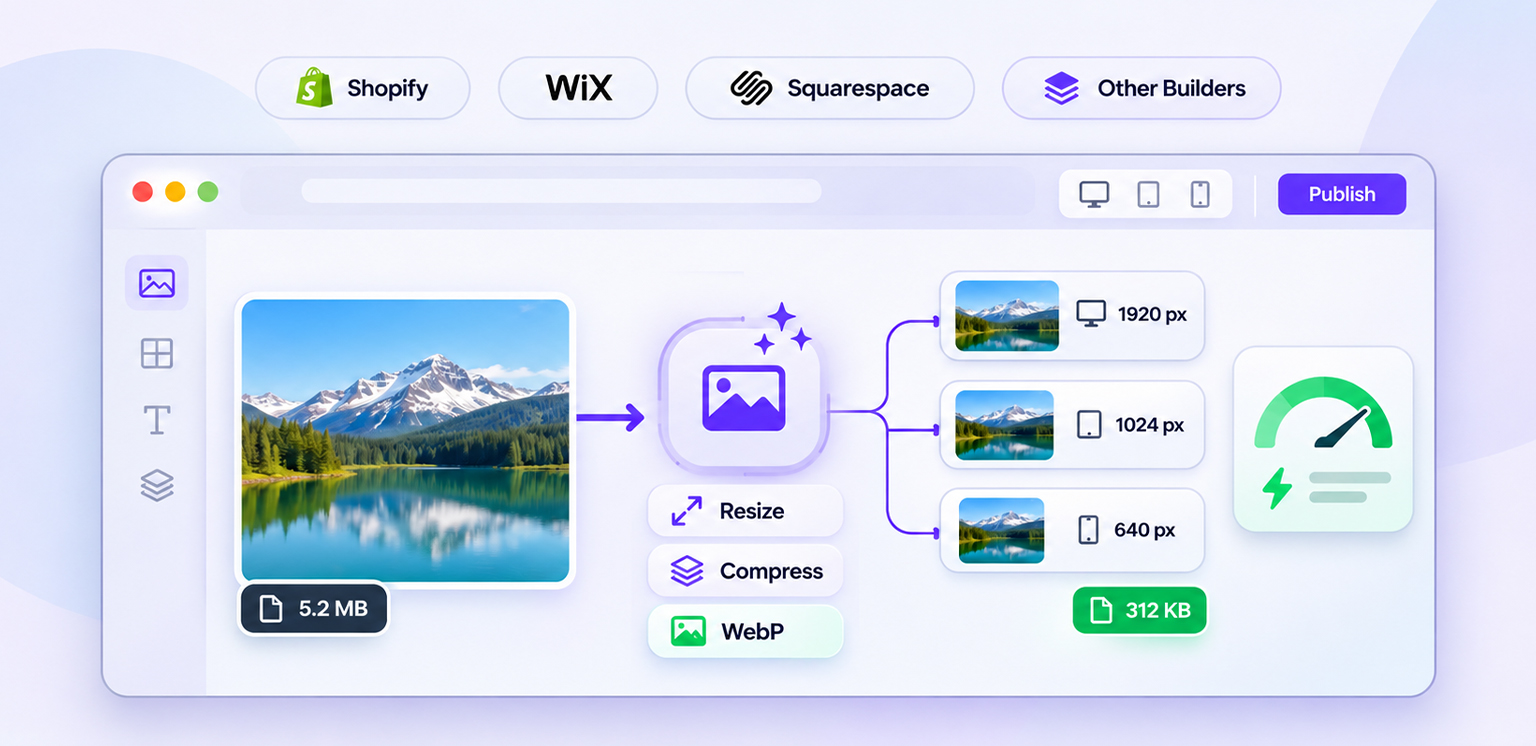
TL;DR: Yes, many website builders perform some level of automatic image optimization, such as resizing, compression, format conversion, or responsive delivery. However, website builders optimize images differently, and their built-in processing does not always replace a complete website image optimization workflow.
Uploading an image to a website builder no longer means serving the exact original file to every visitor. Many platforms now handle some image processing automatically behind the scenes.
But that raises an important question: do website builders automatically optimize images enough to keep a site fast?
The short answer is sometimes, but not completely. A platform may resize an image or serve WebP while still leaving issues such as oversized source files, poor dimensions, unnecessary images, or inefficient loading behavior.
The important distinction is between automatic image processing and complete image optimization.
How Website Builders Handle Image Optimization
Website builders now handle several image optimization tasks automatically, but the level of processing differs by platform. The table below shows what each builder typically manages behind the scenes.
| Website builder | Automatic image optimization | What it commonly handles |
|---|---|---|
| Wix | Yes | Image resizing, compression, CDN delivery and related performance optimizations |
| Squarespace | Yes | WebP conversion, responsive image variants and device-based sizing |
| Shopify | Yes, through its image/CDN system | Responsive sizing, format conversion and CDN-based delivery |
| Other builders | Varies | May provide resizing, compression, CDN delivery, or limited processing |
Bottom line: Website builders can automate important parts of image optimization, but you should still check the images actually being delivered to visitors.
What Does Automatic Image Optimization Mean?
Automatic image optimization means a platform processes an uploaded image without requiring you to manually edit and export every version.
Depending on the platform, this can include:
- Compressing image data
- Resizing large images
- Converting JPEG or PNG files into modern formats
- Creating multiple responsive image sizes
- Delivering images through a CDN
- Selecting an appropriate image based on the visitor’s screen
These processes can significantly reduce the amount of work required for website image optimization.
However, they are not necessarily the same thing as deciding whether an image should exist on the page, choosing the right dimensions for its design, writing useful alt text, or controlling when the image loads.
Google also treats image discoverability and technical implementation as separate considerations from simple file compression.
How Do Website Builders Optimize Images?
The exact process depends on the platform, but most modern builders use several layers of image processing.
1. Automatic Image Compression
Some platforms reduce the amount of image data before delivering it to visitors. This is the part most people mean when they ask, “Do website builders compress images?”
Wix, for example, says images uploaded to its platform are automatically resized and that images under 25 MB are automatically compressed.
Compression can reduce file size while maintaining an acceptable visual appearance. The result depends on the original image, dimensions, format, and compression settings.
2. Automatic Image Resizing
Automatic image resizing is particularly useful because a visitor on a phone usually does not need the same image dimensions as someone viewing a large desktop screen.
Instead of sending a 2400px-wide image to every device, a platform can create smaller versions and let the browser request a more appropriate one.
Shopify can generate resized image URLs and responsive image markup through its image_url and image_tag Liquid filters. However, theme implementation matters because these features must be used when rendering merchant-uploaded images. Theme assets served directly through asset_url are not automatically resized through the same process.
This is one reason website builder image optimization can be more sophisticated than simply compressing an uploaded JPEG.
3. Modern Image Formats
Some website builders automatically convert uploaded images into formats better suited to web delivery.
Squarespace states that uploaded images are automatically displayed in WebP format by default and that it creates multiple image widths for responsive delivery.
Modern formats can reduce file size for comparable visual quality, although the best format depends on the image and browser support.
4. Responsive Image Delivery
A platform may create several versions of the same image and allow the browser to select an appropriate one.
For example, a website could have:
The browser can then select a suitable source based on the display conditions.
This matters because website builders’ image compression alone does not solve the problem of delivering unnecessarily large dimensions.
Which Website Builders Automatically Optimize Images?
This section compares how popular website builders handle image optimization by default. The level of compression, resizing, format conversion, and responsive delivery varies across platforms.
Shopify
Shopify provides image optimization through its CDN and image transformation system. Images aren’t necessarily compressed when uploaded to the Shopify admin. Instead, images served through storefront themes can undergo compression, resizing, and automatic format selection based on browser support. Shopify’s image_url and image_tag filters also help developers generate appropriately sized images and responsive srcset markup.
For Shopify stores, image optimization therefore involves more than manually compressing product photos. The way images are referenced in the theme also affects what gets delivered.
Wix
Wix automatically processes images for website delivery. Its performance documentation describes automatic image resizing, compression, CDN delivery, and lazy loading. Wix also states that images on live sites are automatically converted and compressed using AVIF, while uploaded images under 25 MB are covered by its automatic compression process. This reduces the need to manually optimize every image before uploading it.
However, automatic processing does not mean every image is automatically ideal for every page. The original dimensions, visual content, layout, and loading behavior can still matter.
Squarespace
Squarespace automatically converts uploaded images to WebP by default and creates multiple image widths for responsive delivery. Its documentation says it can create up to seven versions of an uploaded image, allowing the site to select an appropriate size for the visitor’s screen.
That makes Squarespace’s built-in system useful for automatic image resizing and format optimization.
However, Squarespace itself recommends keeping uploaded images reasonably sized, with 500 KB or less suggested as a practical target for many images.
BigCommerce and other platforms
BigCommerce also provides image optimization capabilities through its CDN, including image resizing and transformation. However, responsive image delivery depends on how the storefront implements image components, sizing, and srcset markup. Other website builders and ecommerce platforms may offer similar capabilities, but their implementations vary.
For example, an ecommerce platform may optimize product images automatically while leaving theme assets, background images, third-party content, or previously uploaded files outside the same optimization workflow.
That is why website image optimization tools can still be useful even when a platform already provides some automation.
What Website Builders Don’t Automatically Fix
Built-in optimization is useful, but it has limits. Website builders may handle basic compression and resizing, while other factors such as image dimensions, loading behavior, and overall delivery may still require attention.
Oversized Source Images
A platform may generate optimized versions from a large upload, but starting with unnecessarily huge files can still create storage, processing, and workflow issues.
For example, uploading a 6000px product photograph when the largest displayed version is 1200px is usually unnecessary.
A practical first step is to identify oversized images that are much larger than their rendered dimensions.
Poor Image Dimensions
Compression reduces file size. It does not automatically make an image’s dimensions appropriate for its placement.
A 3000 × 2000 image compressed to a smaller file can still be excessive if it is displayed at 600 × 400.
This is why automatic image compression and responsive sizing should be treated as separate parts of optimization.
Images That Should Not Load Immediately
An image can be compressed perfectly and still hurt performance if it is loaded too early. A page with a large hero image, product gallery, and dozens of below-the-fold images needs sensible loading priorities.
The visible main image may need to load early, while images further down the page can often be lazy-loaded. For ecommerce sites, the distinction between responsive images and lazy loading is particularly important.
Images That Are Visually Wrong After Processing
Automatic compression can sometimes produce results that are technically smaller but visually unsuitable. Product photography, transparent graphics, screenshots, logos, and detailed images can react differently to compression.
If an important product image looks blurry after processing, the problem may be the compression settings, format, dimensions, or repeated image processing rather than compression itself.
How to Check Whether Your Website Builder Is Optimizing Images
Don’t assume that an image is optimized simply because your platform says it is. The most reliable approach is to inspect what the browser actually receives.
Check the Delivered Image Format
Open Chrome DevTools and inspect the image requests in the Network panel.
Select an image request and check its response headers, particularly the Content-Type, to identify the format actually delivered by the server. Then review the image’s dimensions, transferred file size, and request URL. Compare these details with the original upload to determine whether the platform is serving a smaller or differently formatted version.
Compare Rendered and Intrinsic Dimensions
If an image is displayed at approximately 500px wide but the browser downloads a 2500px-wide file, the page may be sending more data than necessary.
Responsive image markup, srcset, and sizes can help solve this.
Check File Sizes
Look at the transferred size of important images, particularly the largest images on the page. A compressed image is not automatically an optimized image if it is still much larger than necessary.
Test Mobile Performance
Always check how images behave on mobile rather than judging optimization from desktop alone.
A page can look perfectly fast on a high-speed desktop connection while sending unnecessarily large image files to mobile visitors.
When Do You Need Additional Image Optimization?
If your website builder already compresses, resizes, and serves modern image formats, you may not need another layer for every image.
Additional website image optimization becomes more useful when you have a large image library, frequent uploads, ecommerce catalogs, inconsistent image quality, or images coming from multiple sources.
For example, a store with 10,000 product images has a different maintenance problem from a five-page portfolio site.
Manual optimization may work for a small website. At larger volumes, an automated workflow can identify and process images consistently as the library changes.
This is where automated image optimization can complement the platform’s own image processing rather than simply duplicate it. The workflow is also important for large ecommerce catalogs that require consistency across dimensions, formats, compression, and delivery.
What about images already uploaded to your website?
A platform’s automatic image delivery features do not necessarily mean that your original image library has been permanently compressed or replaced. Some platforms generate optimized versions when serving images to visitors, while others may use different processing workflows. Check whether your existing images are optimized as part of the platform’s delivery system or whether they require a separate bulk optimization process. This is particularly important for websites with large product catalogs or years of accumulated media.
Website Builder Optimization vs. Dedicated Image Optimization
This comparison shows what website builders handle automatically versus what dedicated image optimization tools can add. It helps clarify where built-in optimization is sufficient and where more control or automation may be useful.
| Capability | Website builder | Dedicated optimization workflow |
|---|---|---|
| Basic compression | Often | Yes |
| Automatic resizing | Often | Yes |
| Modern formats | Often | Usually |
| Responsive variants | Often | Yes |
| Bulk processing | Varies | Common |
| Existing image library audit | Limited/varies | Stronger |
| Custom compression control | Limited | More control |
| Ongoing optimization | Platform-dependent | Can be automated |
| Cross-platform workflow | Usually no | Often possible |
The key is not to assume that one system must replace the other. A website builder can handle delivery-level optimization, while a dedicated workflow can address the underlying image library and ongoing asset management.
Conclusion
So, do website builders automatically optimize images? In most modern platforms, yes to some extent. Compression, resizing, responsive delivery, format conversion, and CDN delivery are increasingly built into the platform.
But website builders optimize images differently, and automatic processing does not guarantee that every image is correctly sized, efficiently loaded, or consistently optimized.
The practical approach is to check the images your visitors actually receive. If the browser is getting appropriately sized, compressed, modern-format images at the right time, your builder may already be handling much of the work. If not, additional website image optimization can close the remaining gaps.
FAQs
Q1: Do website builders automatically compress images?
Q2: Do website builders resize images automatically?
Q3: Are images automatically optimized on Shopify?
Q4: Does Wix automatically optimize website images?
Q5: Does Squarespace compress images automatically?
Q6: Do I still need an image optimization tool if my website builder optimizes images?
5 November, 2026
Leave a Comment
Ishan Makkar
He is a web performance specialist focused on image optimization and site speed. As the founder of Image Optimizer Pro, he helps businesses reduce image load times and improve Core Web Vitals. His work centers on delivering faster websites, better user experience, and measurable SEO gains without complex development.