
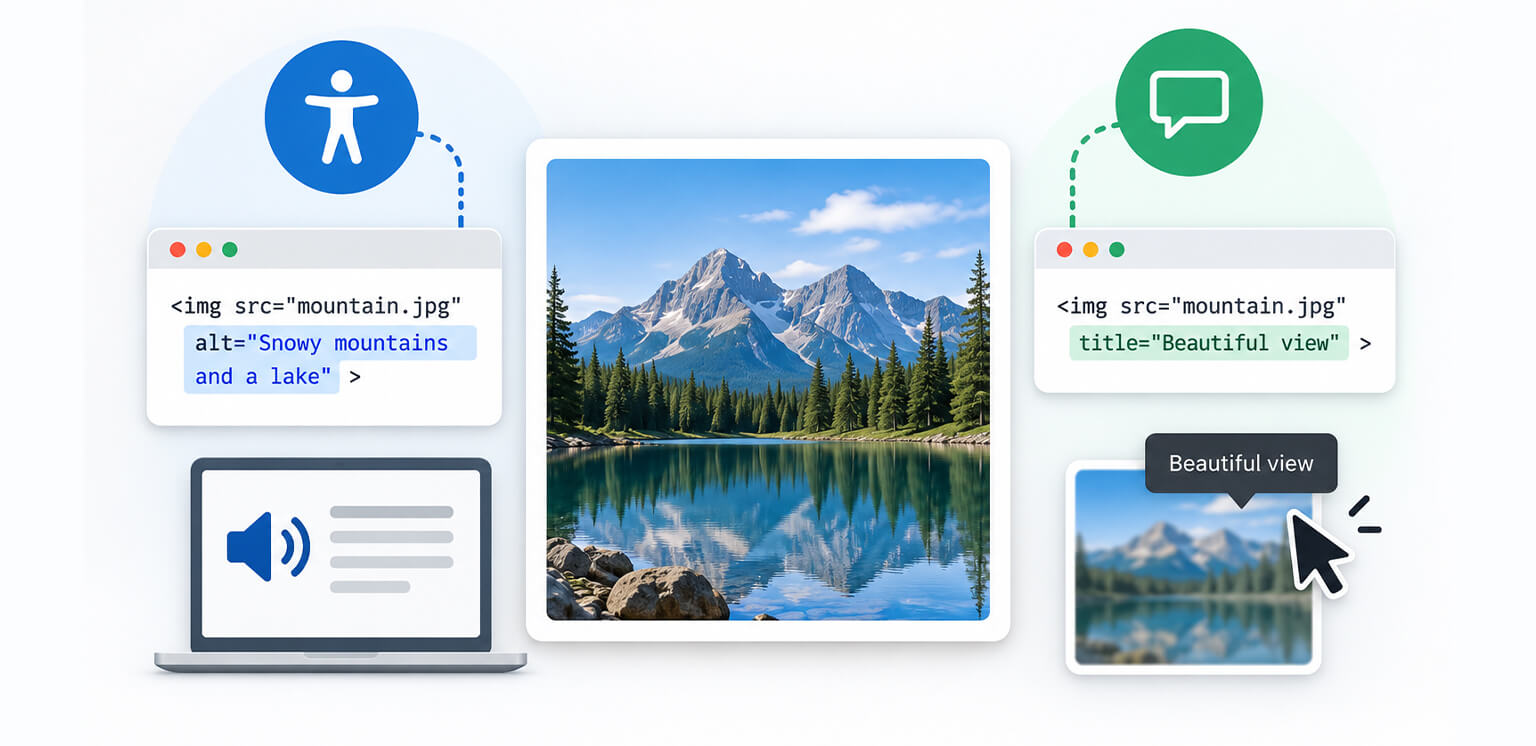
TL;DR: Alt text and an image title are not interchangeable. Alt text provides a text alternative for an image and is important for accessibility and image understanding. The HTML title attribute is optional metadata that may appear as a tooltip and should not replace alt text. For most images, prioritize meaningful alt text and use title only when it adds genuinely useful, non-essential context.
If you have ever edited an image in HTML or a CMS, you have probably seen both alt text and the title attribute. Because both can contain descriptive text, it is easy to assume they serve the same purpose. They do not.
The difference between alt text and image title comes down to function. Alt text acts as a textual alternative to an image when the image cannot be perceived, while the title attribute provides optional additional information that browsers may display as a tooltip.
That distinction matters for accessibility, image SEO, and how you structure your HTML.
Alt Text vs Image Title: Quick Comparison
Alt text and image titles serve different purposes: alt text provides a text alternative for accessibility and image understanding, while the title attribute offers optional supplementary information, often as a tooltip.
| Attribute | Alt text | Image title |
|---|---|---|
| HTML attribute | alt |
title |
| Primary purpose | Text alternative for an image | Optional additional information |
| Accessibility importance | High | Limited and inconsistent |
| Expected on <img> | Yes; use an appropriate value, including alt="" for decorative images |
No |
| Helps describe image content | Yes | Not as a substitute |
| Used by Google to understand images | Yes | Not a primary image metadata signal |
| Usually appears as a tooltip | No | Often, depending on browser |
| Can replace alt text? | – | No |
| Best practice | Write concise, contextual alt text | Use only when genuinely useful |
Google specifically identifies alt text as important image metadata and says it uses alt text along with computer vision and page content to understand images.
What Is Alt Text?
Alt text is the text value provided through the alt attribute of an HTML <img> element.
For example:
<img src="blue-running-shoes.jpg"
    alt="Blue men's running shoes with white soles">
The purpose of alt text is not simply to describe a picture for search engines. It provides a text alternative for the image’s meaning or function.
This becomes particularly important when someone cannot see the image, when an image fails to load, or when assistive technology such as a screen reader interprets the page.
MDN describes alt as a textual replacement for the image, while W3C recommends text alternatives based on whether an image is informative, decorative, or functional.
Why Alt Text Matters for Accessibility
Imagine a product page containing an image of a black leather backpack. A useful alt attribute might be:
<img src="black-leather-backpack.jpg" alt="Black leather backpack with two front pockets">
A screen reader can communicate that information to someone who cannot see the product image. By contrast, this provides little useful information:
<img src="black-leather-backpack.jpg" alt="image">
The goal is to communicate the relevant information, not merely announce that an image exists. For decorative images, the appropriate choice is generally an empty alt value:
<img src="decorative-line.svg" alt="">
W3C recommends alt="" for images that add no meaningful information and should be ignored by assistive technologies.
What Is an Image Title Attribute?
An image title is usually the value of the HTML title attribute placed on an <img> element.
For example:
<img src="blue-running-shoes.jpg"
    alt="Blue men's running shoes with white soles"
    title="Available in sizes 7–12">
Unlike alt, the title attribute is not a text alternative.
Browsers commonly display title text as a tooltip when a user hovers over an element with a mouse. However, that behavior is not a reliable way to communicate important information because users on touchscreens or those navigating with keyboards may never see the tooltip. MDN specifically cautions against relying on the title for information users need.
This is the core distinction between alt text vs title attribute:
Alt text helps communicate what the image means. The title attribute can provide optional additional information about the element.
Alt Text vs Image Title: The Key Differences
The easiest way to understand image alt text vs title is to look at what happens when each attribute is used.
| Factor | alt attribute |
title attribute |
|---|---|---|
| Main role | Text alternative | Additional information |
| Accessibility | Fundamental for meaningful images | Limited |
| Image fails to load | Can provide a textual replacement | Does not serve as the replacement |
| Screen reader experience | Commonly used to convey image meaning | Support and behavior vary |
| Tooltip | No | Commonly displayed on hover |
| Google image understanding | Relevant | Not a substitute for alt text |
| Mandatory on <img> | Appropriate alt value should be provided | No |
| Can it be omitted? | Better practice is alt="" for decorative images |
Yes |
| Should it contain keywords? | Only when natural and relevant | No SEO keyword stuffing |
| Should I duplicate alt? | – | Generally no |
Primary Purpose
Alt text provides a text alternative for an image when the image cannot be perceived or loaded. It communicates the image’s relevant content or function to users of assistive technologies and can also help search engines understand the image.
The image title attribute provides optional supplementary information about an element. It may appear as a browser tooltip when a user hovers over the image, but it is not a replacement for alt text and should not contain information that users need to access.
Accessibility
Alt text has a direct accessibility role. Screen readers can use an image’s alt value to communicate relevant information to users who cannot see the image. For decorative images, an empty alt="" tells assistive technologies that the image does not add meaningful information.
The title attribute has a much more limited accessibility role. Tooltip behavior is not consistently available across different devices and input methods, so important information should not depend on an image title. If users need to know something, that information is better provided through visible text, a caption, or an appropriate accessible element.
Visibility
Alt text is not normally displayed as part of the page when an image loads successfully. It can become visible when an image cannot be displayed, depending on the browser and circumstances, but its primary purpose is to provide a text alternative rather than a visual label.
An image title may appear as a tooltip when a user hovers over the image. This makes it more visible to some desktop users, but hover-based information is not equally available to touchscreen or keyboard users. That is one reason the title attribute should not be used for essential information.
SEO and Image Understanding
Alt text has a meaningful role in image SEO. Google says it uses alt text, along with computer vision and the content of the page, to understand images. This makes descriptive, relevant alt text useful for helping search engines interpret an image.
The title attribute should not be treated as a primary image SEO field. Google can use information from image titles and other page content when understanding an image, but alt text is more important for providing image metadata. Adding keywords to a title attribute does not make up for missing or poor alt text.
What Happens When the Image Fails to Load?
Alt text can provide a textual alternative when an image cannot be displayed. This helps communicate what the image was intended to convey.
The title attribute does not serve this function. A title attached to an image is supplementary metadata, not an alternative representation of the image.
Should They Contain the Same Text?
Usually, no. Alt text should describe the image’s relevant content or function. A title, when genuinely needed, should provide different and supplementary information.
For example:
<img src="running-shoes.jpg"
    alt="Blue men's running shoes with white soles"
    title="Available in sizes 7–12">
Here, the alt text identifies the image, while the title provides additional product information.
If both attributes simply repeat the same text, the title adds little value and may create redundant information for some assistive technology users.
Alt Text vs Title Attribute: Which Is More Important for SEO?
When comparing alt text vs image title for SEO, alt text is clearly the more important attribute.
Google states that alt text is one of the important pieces of metadata it uses to understand images, together with computer vision and the content surrounding the image. It also recommends useful, information-rich alt text while warning against keyword stuffing.
For example, if an article discusses ecommerce image optimization and shows a product photograph, an appropriate alt attribute might be:
<img src="ecommerce-image-optimization.jpg"
    alt="Ecommerce product image optimized for faster loading">
The description should reflect what the image actually communicates. Using this instead would be poor practice:
<img src="ecommerce-image-optimization.jpg"
    alt="image optimization ecommerce image optimization SEO images">
The second version is written for keywords rather than users. That is why alt text SEO should be approached as descriptive, contextual optimization, not keyword insertion.
Does the Image Title Attribute Help SEO?
The title attribute should not be treated as an SEO replacement for alt text. If an image has:
<img src="product.jpg"
    title="Best product image for SEO">
that does not compensate for missing or poor alt text. If the image needs an accessible text alternative, use alt. If it needs a visible explanation, consider surrounding text or a caption instead.
Should Images Have Title Attributes?
Usually, no title attribute is necessary for ordinary images. This does not mean the title attribute is invalid. it means you should have a specific reason for using it.
Consider:
<img src="chart.png"
    alt="Organic traffic increased from January to June"
    title="Data based on six months of website analytics">
The title provides additional context, but if that information is important to understanding the chart, it would be better presented visibly in the surrounding content or a caption. For an image that already has an appropriate alt attribute, adding an identical title is particularly unhelpful:
<img src="shoe.jpg"
    alt="Red running shoes"
    title="Red running shoes">
MDN recommends avoiding duplicated alt and title values because some screen readers may announce the same information more than once. So, when asking Should images have title attributes?, the practical answer is:
Only when the title provides useful supplemental information that does not belong in the alt text and does not need to be presented more reliably elsewhere.
When to Use Alt Text vs an Image Title
Use alt text whenever the image contributes meaningful information or functionality.
| If your goal is… | Use |
|---|---|
| Provide an alternative for an informative image | alt |
| Describe what a functional image does | alt |
| Mark a decorative image | alt="" |
| Provide optional supplementary information | title may be used |
| Provide important information users need to see | Visible text or <figcaption> |
| Improve image SEO | Focus on relevant, descriptive alt text |
Informative images
For a product photograph:
<img src="white-running-shoes.jpg"
    alt="White running shoes with black mesh panels">
Functional images
If an image itself functions as a button or link, describe the action or destination rather than simply describing its appearance:
<a href="/checkout">
    <img src="checkout-icon.svg" alt="Proceed to checkout">
    </a>
W3C recommends that the alternative for functional images communicate the function of the image rather than merely describing what it looks like.
Decorative images
For an image that contributes no meaningful information:
<img src="decorative-shape.svg" alt="">
Do not force keywords into decorative image alt attributes simply because the image exists on an SEO-focused page.
Alt Text Best Practices for SEO and Accessibility
Good alt text is usually specific, concise, and relevant to the image’s role on the page.
Describe the useful information
Instead of
alt="product"
use alt="Black leather laptop backpack with padded shoulder straps".
Avoid unnecessary keyword repetition
If your target keyword is “ecommerce image optimization,” you do not need to force it into every image. Google explicitly advises against keyword stuffing in alt attributes.
Consider the surrounding content
Alt text should work together with the page copy rather than repeat it unnecessarily.
If a paragraph already explains everything an image communicates, an empty alt attribute may be appropriate for a purely supplementary image. W3C recommends considering the image’s purpose and surrounding context when deciding its text alternative.
Keep it concise
W3C recommends making the text alternative as concise as possible while preserving the image’s relevant purpose or information.
Don’t start every alt attribute with “image of”
Screen readers already communicate that an element is an image in many situations. Saying:
alt="Image of a blue backpack"
is usually less efficient than:
alt="Blue backpack with three front pockets".
Common Alt Text and Image Title Mistakes
The most common mistake is treating title as a backup for missing alt text.
For example:
<img src="product.jpg"
    title="Black leather handbag">
This does not provide the same function as:
<img src="product.jpg"
    alt="Black leather handbag">
Another common mistake is duplicating both:
<img src="product.jpg"
    alt="Black leather handbag"
    title="Black leather handbag">
Duplicating the same text in both attributes is usually unnecessary and may create redundant information for some assistive technology users. A third mistake is using long marketing copy as alt text:
alt="Buy the best premium black leather handbag at an amazing price today"Alt text should communicate the image’s relevant content or function, not become an advertisement.
Alt Text vs Image Title: What Should You Use?
If you’re choosing between alt text and an image title, use alt text for the image’s essential meaning or function. Use the title attribute only for genuinely useful supplementary information, and don’t add it simply because an image has alt text.
If the information is essential, put it in the alt text or visible page content. If the image is decorative, use alt="". If the image needs a caption, use <figcaption> rather than trying to turn the title attribute into a caption.
If you are optimizing images for Google, focus on accurate alt text, relevant page context, crawlable image implementation, and overall image quality rather than adding title attributes for SEO purposes. Google specifically highlights alt text as useful metadata for helping it understand images.
Conclusion
The difference between alt text and image title is primarily about purpose.
Alt text is the important one: it provides a textual alternative for images, supports accessibility, and helps search engines understand image content. The HTML image title attribute is optional and can provide supplemental information, but it should not be used as a substitute for alt text or as an SEO shortcut.
For most websites, a better approach is simple: write useful alt text when an image conveys information, use alt="" for genuinely decorative images, and skip the title attribute unless it serves a clear secondary purpose. That keeps your HTML cleaner while making your images more useful to both people and search engines.
Frequently Asked Questions
Is alt text the same as an image title?
Does an image title attribute help SEO?
Should every image have alt text?
Should every image have a title attribute?
Can alt text and title attribute be the same?
Does alt text affect Google Image Search?
11 September, 2026
Leave a Comment
Ishan Makkar
He is a web performance specialist focused on image optimization and site speed. As the founder of Image Optimizer Pro, he helps businesses reduce image load times and improve Core Web Vitals. His work centers on delivering faster websites, better user experience, and measurable SEO gains without complex development.