
TL;DR: The right type and format of web images matters a lot for website performance and user experience. This guide will help you compare the vector vs raster image files to determine their right use on your websites. Discover the uses, pros, and cons of both types to enhance website performance.
Choosing the right image type is crucial for website speed, design quality, and scalability. Whether you’re preparing product images, optimizing UI elements, or designing your brand identity, understanding raster vs vector images helps you balance visual quality and performance.
Raster and vector graphics serve fundamentally different purposes. Raster formats provide photo-realistic detail, while vector graphics offer infinite scalability. In this guide, we will break down both types, based on their formats, use cases, pros, and cons, to help you decide which one is best for your website.
What Is the Vector File Type?
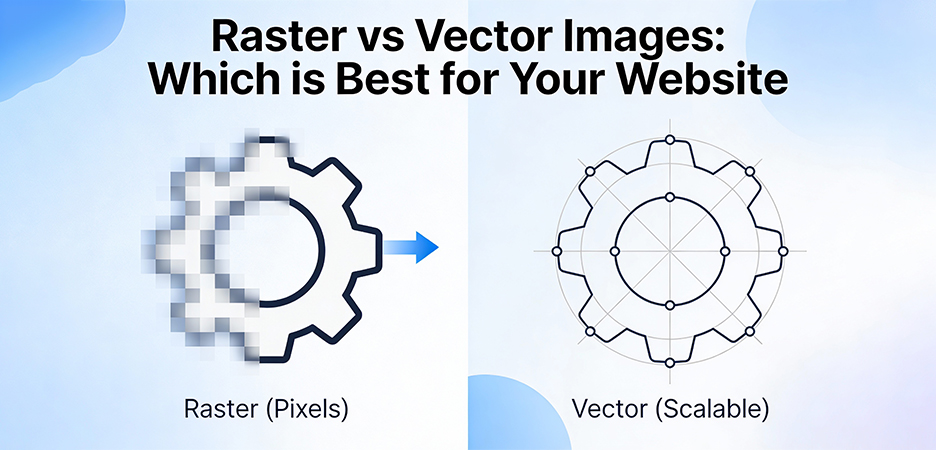
A vector file type utilizes mathematical formulas, including points, curves, shapes, and paths, to create graphics. Instead of relying on pixels, the image is built from scalable geometric instructions. This makes vector graphics completely resolution-independent.
According to the W3C (World Wide Web Consortium) SVG specification, vector files can scale infinitely without pixelation because their elements are defined mathematically, not stored as a grid.
Key characteristics of vector files:
- They remain sharp at any size (from favicon to billboard).
- They are ideal for clean, flat shapes like logos, icons, diagrams, charts, and illustrations.
- They often have smaller file sizes when graphics are simple.
- They allow easy edits, colors, shapes, and nodes can be modified without degrading quality.
Vector graphics are essential for responsive websites where visuals must adapt to different screen sizes, including retina and high-density displays.
What Are the Main Vector File Types?

The main vector file formats include SVG, AI, EPS, PDF, DXF, and CDR. These formats are resolution-independent and scale without losing quality. Below are the key vector file types explained, commonly used for web graphics, branding, print, and technical design.
1. SVG (Scalable Vector Graphics)
- XML-based and web-native (W3C standard).
- Supports CSS styling, JavaScript interactivity, and animations.
- Fully scalable without loss of quality.
- Perfect for web icons, logos, UI elements, and illustrations.
2. EPS (Encapsulated PostScript)
- A legacy but widely compatible vector format.
- Common in print workflows and signage.
- Supports vector shapes and embedded previews.
3. AI (Adobe Illustrator File)
- Adobe’s proprietary vector format.
- Used for professional branding, logo design, and detailed illustration work.
- Often includes artboards and editable layers.
4. PDF (Portable Document Format)
- Supports both raster and vector data.
- Used for logos, print documents, and scalable graphics.
- Preserves resolution for print and digital use.
5. DXF (Drawing Exchange Format)
- A vector-based format developed by Autodesk for CAD (Computer-Aided Design) drawings.
- Supports precise geometric shapes, lines, paths, and 2D/3D design data.
- Commonly used for engineering diagrams, architectural plans, CNC cutting, laser engraving, and technical illustrations.
- Highly interoperable, allowing designs to be shared across CAD software and manufacturing tools.
6. CDR (CorelDRAW File Format)
- Native file format used by CorelDRAW for creating vector graphics.
- Supports vector shapes, text, layers, and can include embedded raster images.
- Commonly used for logo design, illustrations, signage, and print-ready artwork.
- Preserves full editability, making it ideal for professional design workflows within the Corel ecosystem.
These formats form the backbone of modern branding, UI design, and scalable digital graphics.
What Is the Raster File Type?
A raster file is made of pixels where tiny colored squares are arranged in a grid. The detail of a raster image depends on its resolution (example: 1920×1080). If you stretch the image beyond its resolution, individual pixels become visible, causing blur or pixelation.
Key Characteristics of Raster Files
- They are made of pixels arranged in a grid, with each pixel storing its own color value.
- They are ideal for detailed visuals like photographs, textures, gradients, and realistic artwork.
- Their file size increases as resolution increases, because more pixels mean more data.
- They lose quality when scaled up, enlarging a raster image leads to blurriness or pixelation.
Because each pixel has its own color value, raster files handle realistic visuals far better than vector formats. For using these images on your website, you require Raster image optimization to avoid slow loading speeds.
What Are the Main Raster File Formats?

The main raster file formats include JPEG/JPG, PNG, WebP, AVIF, GIF, TIFF, PSD, and BMP. These formats are pixel-based and best suited for photographs, detailed visuals, and realistic graphics.
Below are the key raster file formats explained, commonly used for web images, design editing, and high-quality print:
1. TIFF (Tagged Image File Format)
- A high-quality raster format widely used in photography, printing, and professional imaging workflows.
- Supports lossless compression, layers, and high bit-depth images for maximum detail.
- Ideal for archiving, editing, and situations where image fidelity must be preserved.
- Produces large file sizes, making it less suitable for websites.
2. PSD (Photoshop Document)
- Adobe Photoshop’s native layered file format for raster graphics and image editing.
- Supports layers, masks, filters, transparency, vector shapes, and smart objects.
- Used for complex graphic design projects, retouching, and multi-layer editorial work.
- Not web-compatible, typically exported to PNG, JPG, WebP, or AVIF for online use
3. JPEG / JPG
- Designed for photographs and rich visuals.
- Uses lossy compression to keep file sizes low.
- Widely supported across all devices and browsers.
4. PNG
- Lossless compression (retains every pixel as-is).
- Supports transparency (alpha channel).
- Ideal for product images on transparent backgrounds, icons, and screenshots.
5. WebP
- Modern image format introduced by Google.
- Supports both lossy and lossless compression.
- Reduces file size significantly compared to JPEG and PNG.
- Widely supported in modern browsers (Chrome, Edge, Firefox, Safari).
6. BMP (Bitmap Image File)
- An uncompressed raster format developed by Microsoft that stores pixel data directly.
- Produces large file sizes because it uses little to no compression.
- Supports high-quality color but is inefficient for web use due to heavy storage requirements.
- Mostly used in older systems, simple graphics tools, or legacy applications.
7. AVIF
- Based on the AV1 codec for advanced compression.
- Supports HDR, transparency, animations, and excellent detail at smaller sizes.
- Considered one of the Best image file formats for performance if compatibility suits your audience.
8. GIF
- Limited to 256 colors.
- Used for basic animations or simple graphics.
Raster vs Vector Images: Key Difference Explained
Based on various features and uses of both raster and vector images, you can choose the right image format for your website. Here’s a comparison table highlighting their main differences:
| Feature | Raster Images | Vector Images |
|---|---|---|
| Structure | Pixel grid | Mathematical paths |
| Scalability | Loses quality when enlarged | Infinitely scalable |
| Best For | Photos, detailed textures | Logos, icons, illustrations |
| File Size | Large for high-resolution images | Small for simple graphics |
| Color Depth | Excellent for complex gradients | Limited unless manually designed |
| Website Use | Product photos, hero banners | UI icons, logos, SVG illustrations |
| Editing | Pixel-level editing (Photoshop) | Node-based editing (Illustrator) |
| Optimization Needs | High → compression, resizing | Low → usually lightweight |
| Transparency | PNG/WebP support it | SVG supports shape-based transparency |
This comparison explains why many websites use Raster images vs vector images together instead of relying on only one type.
Where to Use Raster Images?
With its pixel-based structure, raster images are best when your website requires realism, depth, or detailed textures. It is widely used for various digital and physical media applications.
Use raster images for:
- Lifestyle photographs
- Product images in eCommerce
- Hero banners with detailed visuals
- Portfolio photography
- Texturing in 3D modelling
- Blog illustrations
- Medical imaging
- Graphics requiring complex gradients
- Background images and textured designs
- Digital paintings and posters
These formats excel when visual richness is essential. To ensure performance, apply Raster image optimization techniques such as compression (WebP/AVIF), resizing to the required dimensions, and avoiding unnecessarily large images. This improves loading speed and Core Web Vitals significantly.
Where to Use Vector Images?
Vectors are ideal where clarity, sharpness, and scalability matter.
Use vector images for:
- Logos (require crisp quality at any size)
- Icons (small file size, retina-friendly)
- Infographics (scalable for mobile/desktop)
- UI components (SVG loads faster than many PNGs)
- Charts and illustrations
- Line art and flat graphics
- Animated graphics (SVG animations)
On modern websites, when to use vector images is simple. Whenever graphics need to scale across devices without losing clarity. They also support Vector image optimization, often reducing unnecessary code in SVG files for even faster loads.
Pros and Cons of Vector Images
Vector images offer exceptional scalability and clarity, but they are not suitable for every type of visual. Understanding their advantages and limitations helps you decide when vectors are the best choice for your website.
| Pros | Cons |
|---|---|
|
|
Pros and Cons of Raster Images
Raster images deliver rich detail and realism, but they also come with limitations that affect scalability and performance. Knowing their pros and cons helps you use them effectively on your website.
| Pros | Cons |
|---|---|
|
|
Conclusion
Understanding Raster vs Vector Images helps you choose the right format for performance, clarity, and visual quality. Choose between raster and vector images according to different image needs.
High-performing websites rarely rely on a single image type. Instead, they strategically combine raster and vector images based on visual intent, device responsiveness, and performance goals. By applying proper raster image optimization and clean vector image optimization, you can significantly improve load speed, visual consistency, and user engagement, without sacrificing quality.
FAQs
Q1. What is the difference between raster and vector images?
Q2. Which file formats are raster and which are vector?
- Vector file formats: SVG, AI, EPS, PDF
- Raster File Formats: JPG/JPEG, PNG, GIF, WebP, AVIF
Q3. How do raster and vector images differ in scaling?
Q4. Which image type is better for performance or page load speed?
Q5. Can I convert a raster image to a vector image?
8 January, 2026
Leave a Comment
Ishan Makkar
He is a web performance specialist focused on image optimization and site speed. As the founder of Image Optimizer Pro, he helps businesses reduce image load times and improve Core Web Vitals. His work centers on delivering faster websites, better user experience, and measurable SEO gains without complex development.