
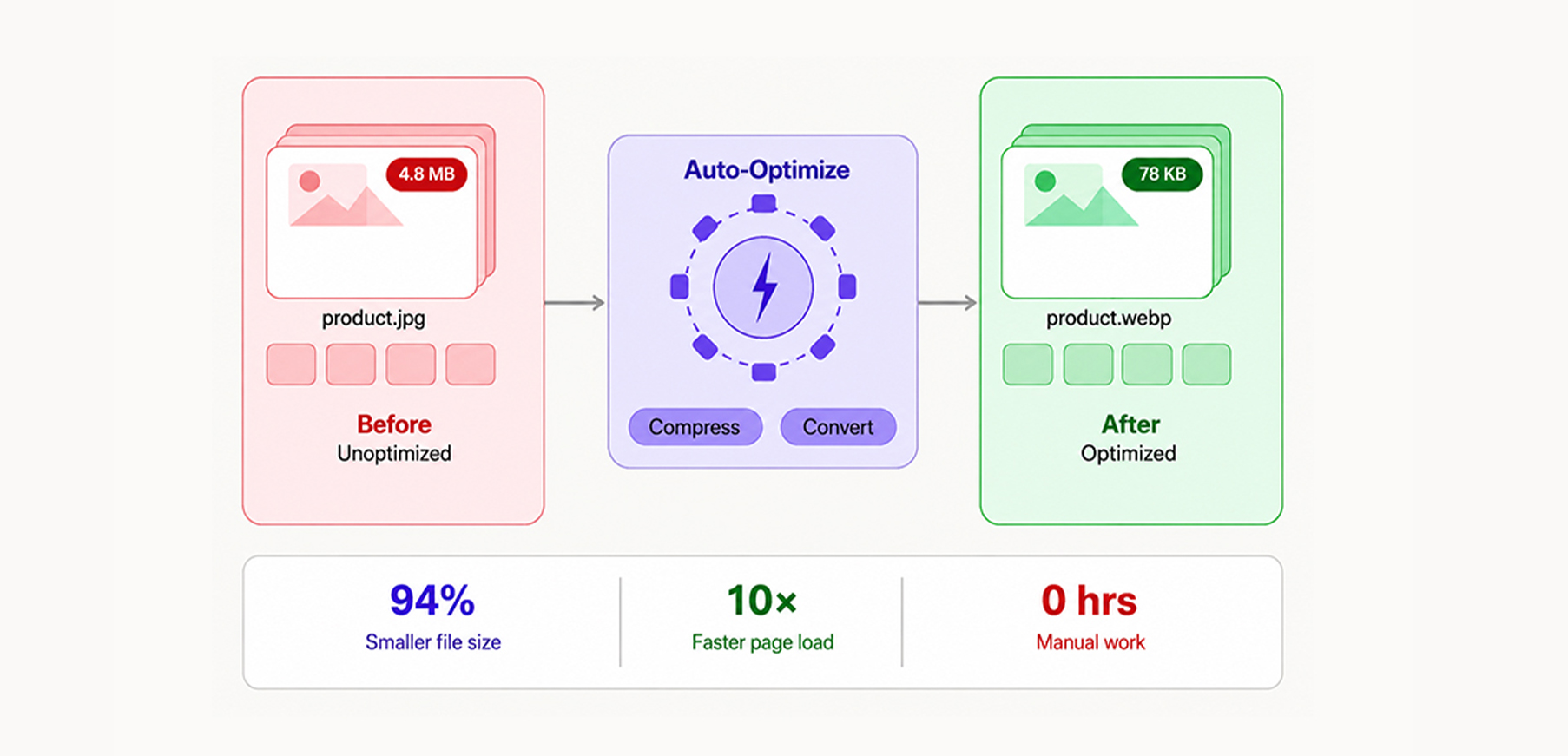
TL;DR: Bulk product image optimization helps eCommerce stores improve page speed, boost SEO rankings, reduce bounce rates, and increase conversions by automatically compressing and converting thousands of images without manual effort.
Running an online store with hundreds or thousands of products means dealing with one very common, very painful problem: image bloat. Every product image that goes unoptimized slows down page load times, hurts Google rankings, and lowers conversions. There’s no reason to optimize each image manually anymore. This guide walks through exactly how to optimize thousands of product images efficiently and what tools and techniques make it possible at scale.
Why Product Image Optimization Actually Matters
According to Shopify, making a website just one second faster can lead to a 7% increase in conversions. A two-second load time improvement can push that number to 15%. And when it comes to mobile, where over 59% of all web traffic now originates, things get even more critical. A one-second improvement in mobile load speed improves conversion rates by 5.9% and reduces bounce rate by nearly 9%.
Product images are almost always the heaviest assets on any e-commerce page. A typical product detail page (PDP) on an unoptimized store can carry 3-8 MB worth of images alone. Multiply that across a catalog of 500, 5,000, or 50,000 SKUs, and the performance debt becomes enormous.
The impact is real and measurable. Rakuten 24 reported significant conversion and revenue improvements after improving Core Web Vitals performance, including optimizations related to page rendering and media delivery.
Bulk product image optimization is a direct revenue lever for businesses. Wondering how? Let’s explore the key reasons below.
What Happens When Images Are Properly Optimized
The impact shows up across speed, search visibility, and how users actually interact with the page.
Page Speed and Core Web Vitals Improve Significantly
Google’s Core Web Vitals directly influence search rankings, and two of the three main metrics, Largest Contentful Paint (LCP) and Cumulative Layout Shift (CLS), are heavily influenced by image handling.
LCP measures how long it takes for the largest visible element on a page to load. On most product pages, that element is the hero product image. A properly compressed, correctly sized, and format-optimized image can cut LCP by several seconds. Google targets an LCP under 2.5 seconds for a “good” score.
CLS, which measures how much the page layout shifts as elements load, is often triggered by images that load without predefined dimensions. Optimization pipelines that also enforce consistent aspect ratios and lazy loading reduce CLS significantly.
Optimized Images Support Better SEO Performance
Stores with faster pages, lower bounce rates, and better engagement signals consistently outrank slower competitors in organic search. For E-commerce, product and category pages optimized for speed earn more visibility without increasing ad spend.
Beyond page speed, image file names, alt text, and structured data around product images contribute directly to how Google indexes and surfaces products in Google Shopping and image search results.
Faster Product Images Improve User Engagement
When a page loads fast, people stay. When it’s slow, they leave – often before the first product image even finishes loading. 46% of mobile users say waiting for pages to load is what they dislike most about browsing on mobile.
For product-heavy stores, faster image loading directly translates to more pages viewed per session and higher add-to-cart rates.
The Core Problem: Manual Image Optimization Doesn’t Scale
Most store owners start the same way, manually exporting images, running them through an online compressor, re-uploading the files, and hoping the URLs don’t break. For five products, that’s manageable. For 500, it’s a part-time job. For 5,000+, it’s simply not possible.
Here’s what manual optimization actually looks like in practice:
- Download the original image from the store backend
- Open a compression tool and adjust quality settings
- Export to the correct format (JPEG, PNG, or WebP)
- Rename the file to match the original exactly
- Re-upload and verify the URL hasn’t changed
- Repeat for every single image, every time
When a store has seasonal catalog updates, new product launches, or dozens of variant images per SKU, this process becomes completely unmanageable. New uploads get skipped, older unoptimized files stay live, and the performance gap widens over time.
The only real solution is automation, a tool that handles product image compression in bulk without requiring manual intervention per file.
How Automated Bulk Image Optimization Works
The entire point of modern image optimization tools is to eliminate the manual process entirely. Here’s how an automated pipeline handles things at scale.
Step 1: Catalog Scanning and Detection
A good tool doesn’t wait for manual uploads. It connects directly to the store, scans all existing product images, collection banners, thumbnails, and variant photos, and identifies which ones are unoptimized across the entire catalog.
Step 2: Intelligent Compression: Lossy vs. Lossless
There are two types of compression, and understanding the difference matters for product imagery:
Lossy compression reduces file size by permanently removing some image data. Done well, at quality settings between 75-85%, the visual difference is virtually imperceptible to shoppers, while file sizes can shrink by 60-80%.
Lossless compression removes only metadata and redundant data, with no change to pixel information. Size reductions are smaller (typically 15-30%), but image quality is mathematically identical to the original.
For most product photos, lossy compression at a calibrated quality setting delivers the best balance between size reduction and visual fidelity. The right automation tool lets store owners choose their compression mode rather than applying a one-size-fits-all setting.
Step 3: Automatic WebP Conversion
WebP is a modern image format developed by Google that delivers 25–35% smaller file sizes compared to JPEG and PNG at equivalent visual quality. It supports both lossy and lossless compression, plus transparency, making it a full replacement for both JPEG and PNG in most e-commerce contexts.
Converting thousands of images to WebP one by one is impractical. Automatic WebP conversion handles the entire catalog in a single pass.
Step 4: One-Click Bulk Processing and Auto-Sync
Once the catalog has been scanned and settings confirmed, the entire batch is processed in one operation. Thousands of images are compressed, converted, and replaced with original URLs fully intact. No broken links, no SEO disruption, no need to update references anywhere in the store.
Critically, auto-sync handles everything going forward. Every new image uploaded to the store is automatically optimized on the way in, so the catalog never falls behind after a product launch or seasonal update.
Manual vs. Automatic Optimization: A Direct Comparison
Both approaches get the job done, but the difference in time, consistency, and scale is hard to ignore.
| Factor | Manual Optimization | Automated Bulk Optimization |
|---|---|---|
| Time for 1,000 images | 20-40+ hours | Minutes |
| Consistency of output | Varies by operator | Uniform, rule-based |
| WebP conversion | One file at a time | Entire catalog in one pass |
| URL preservation | Risk of broken links | Original URLs maintained |
| New uploads handled | Must re-optimize manually | Auto-synced on upload |
| Backup and restore | No built-in option | Bulk restoration available |
| Technical skill required | Moderate | None |
Key Features to Look for in a Bulk Image Optimization Tool
When evaluating options for optimizing eCommerce product images at scale, these are the features that actually move the needle.
Multi-Platform Support
Whether the store runs on Shopify, WooCommerce, BigCommerce, Wix, Squarespace, or another platform, the tool should integrate natively. Platform-specific apps are far more reliable than generic upload-and-download tools because they access the media library directly, maintain URL structure, and sync automatically with new uploads.
Compression Mode Control
Stores selling high-end products like jewelry, fashion, and furniture often need near-lossless compression to preserve fine image detail. A tool should offer compression mode selection, not just a single default setting applied uniformly to every image.
Backup and One-Click Restore
Before any bulk operation, original images should be backed up automatically. If a compression setting proves too aggressive or a format change causes rendering issues, restoring the original in one click prevents a significant problem from becoming a permanent one.
Auto-Sync for New Uploads
The biggest maintenance issue with manual optimization is the backlog that accumulates after every product launch. Auto-sync ensures every newly uploaded image is compressed and converted automatically so the catalog stays optimized without ongoing manual work.
Broad Format Support
A complete optimization pipeline handles JPEG, PNG, GIF, and WebP at a minimum. Stores using animated product previews also need GIF optimization. The broader the format support, the less manual intervention is needed for edge cases.
Product Image Optimization Results: Before vs After
The numbers below reflect what typically changes once a proper optimization pipeline is in place.
| Metric | Before Optimization | After Optimization |
|---|---|---|
| Average product image size | 800 KB – 1.5 MB | 150-300 KB |
| Page load time (product page) | 5-8 seconds | 2-3.5 seconds |
| Google PageSpeed Score | 30-55 | 65-90 |
| Bounce rate impact | Baseline | 20-30% reduction |
| LCP (Core Web Vitals) | Poor / Needs Improvement | Good |
A store moving from a 6-second load time to under 3 seconds fundamentally changes the experience for every visitor, on every device, every day.
Common Mistakes to Avoid When Optimizing Product Images at Scale
hero images: The main product image on a PDP is the primary conversion asset. Compressing it too aggressively, below quality 70 on most encoders, introduces visible artifacts that undermine shopper trust. A calibrated setting around quality 75-82 delivers strong size reduction without visible degradation.
mobile image dimensions: Serving a 2,000px wide image to a mobile screen, rendering it at 400px wastes bandwidth and slows load times for the majority of shoppers. Responsive image delivery, serving appropriately sized images based on viewport, is a critical part of a complete optimization strategy.
metadata cleanup: JPEG files often carry EXIF data (GPS coordinates, camera model, shooting settings) that is completely irrelevant to shoppers. Stripping this metadata reduces file size with zero quality impact.
lazy loading: Even well-compressed images slow performance if they all load simultaneously when the page opens. Lazy loading, deferring below-the-fold images until the user scrolls toward them, reduces initial page weight significantly.
enabling auto-sync: Optimizing the existing catalog once and not handling new uploads creates an ever-growing backlog. Automatic processing for new images should be enabled from day one.
Final Thoughts
Optimizing product images at scale is an ongoing part of running a fast, competitive eCommerce store. The performance penalty for leaving images unoptimized is measurable: slower pages, lower PageSpeed scores, higher bounce rates, and fewer conversions.
Automatic batch image optimization with calibrated compression, automatic WebP conversion, format-wide support, and auto-sync for new uploads solves this problem completely and keeps it solved. Stores that get this right load faster, rank higher, and convert more visitors without changing a single product listing.
FAQs
What is bulk product image optimization?
Does image compression hurt product photo quality?
What is WebP, and why should product images use it?
Will bulk optimization break my product image URLs?
How long does it take to optimize a catalog of 10,000 images?
19 May, 2026
Leave a Comment
Ishan Makkar
He is a web performance specialist focused on image optimization and site speed. As the founder of Image Optimizer Pro, he helps businesses reduce image load times and improve Core Web Vitals. His work centers on delivering faster websites, better user experience, and measurable SEO gains without complex development.